Best Indoor Security Cameras

This post may contain affiliate links. Read our policy
A good indoor camera does something a doorbell or outdoor camera can't: it shows you what's actually happening inside your home. Whether you're checking on pets while you're at work, keeping an ear on a sleeping baby, or just want a record of who came and went, an indoor camera is one of the cheapest and most useful smart-home upgrades you can make. This guide covers what to look for, how to think about privacy, and the five indoor cameras we recommend right now.
If you're still building out your whole setup, start with our broader smart home security guide and pair these picks with our roundup of outdoor security cameras so you've got eyes both inside and out.
Placement and privacy
Indoor cameras live in the most personal parts of your home, so where you put them matters as much as which one you buy. Aim for shared spaces — living rooms, entryways, hallways, and rooms where pets stay during the day. Avoid bedrooms and bathrooms unless there's a specific reason, and make sure anyone living with you knows the camera is there.
Privacy controls are just as important as the view. Look for a camera with a physical privacy cover or an easy on/off schedule so the lens is closed when you're home and recording when you're out. Several of our picks include a built-in shutter for exactly this reason. It's a small feature that makes a big difference in how comfortable a camera feels in daily life.
Features to look for
Most indoor cameras share a core set of features, but the details separate the good from the great:
- Video quality: 1080p HD is the baseline today. It's sharp enough to recognize faces and read what's happening across a room.
- Two-way talk: A built-in speaker and microphone let you hear what's going on and speak back — useful for calming a pet or telling a delivery person where to leave a package.
- Night vision: Rooms get dark, so make sure the camera can see in low light. Some models add a spotlight for color night view.
- Motion alerts: Smart notifications tell you the moment something moves, ideally with the ability to draw zones so you only get pinged about what matters.
- Field of view: A wider lens covers more of a room. For large or open spaces, a pan-tilt camera that swivels remotely can replace several fixed units.
Storage and subscriptions
How your footage is saved is the part buyers most often overlook. Cloud storage keeps a rolling history of clips off-site, so even if the camera is stolen you still have the recording — but it usually requires a monthly subscription. Without a plan, many cameras only give you a live view and motion alerts, not saved video you can scroll back through.
Before you buy, check what the camera does for free and what the subscription unlocks. If you want recorded history, factor the monthly cost into your budget; a $25 camera with a recurring plan can cost more over a year than a pricier model with local storage. Decide whether the convenience of cloud clips and longer history is worth the ongoing fee for your situation.
Choosing the right indoor camera
For most people, a simple plug-in camera with HD video, two-way talk, and a privacy shutter covers the job perfectly — that's why our top pick is an everyday workhorse rather than the most expensive option. If you're watching a large or open-plan room, a pan-tilt model that swivels a full 360 degrees lets one camera do the work of several. And if you think you might eventually want the camera outdoors, choose a flexible model that can make the move with you.
Whatever you pick, lean toward a camera that works within the smart-home ecosystem you already use, so it lives in the same app as the rest of your devices. Start with one camera in your highest-priority room, see how it fits into your routine, then add more over time.
Frequently asked questions
Do indoor cameras need to be plugged in? Most of the best indoor cameras are plug-in models, which means they never need recharging and can record around the clock. A longer power cable gives you more freedom in where you mount them.
Can I see my camera when I'm away from home? Yes. As long as the camera and your phone both have an internet connection, you can pull up a live view and receive motion alerts from anywhere through the camera's app.
Is a subscription required to use an indoor camera? No — you can view a live feed and get motion alerts for free on most cameras. A subscription is only needed if you want recorded video history you can scroll back through, so decide whether saved clips matter to you before you buy.
Best Overall
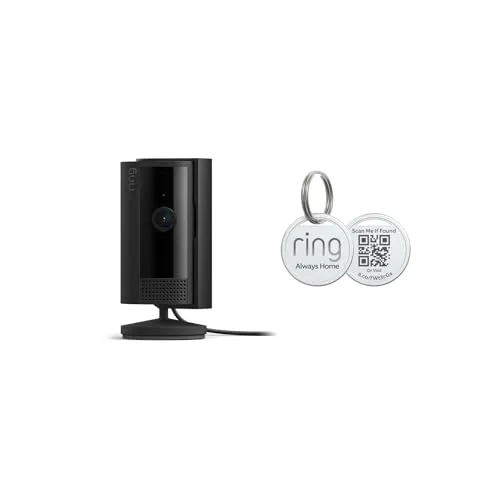
A compact, plug-in camera that keeps an eye on any room without taking up space.
A compact, plug-in camera that keeps an eye on any room without taking up space. You get a live view and motion alerts on your phone, two-way talk so you can check in on pets or kids, and a built-in privacy cover you can close when you want the camera off. It's the easiest indoor camera to set up and the one we recommend to most first-time buyers.
Affordable, simple to set up, and the physical privacy cover gives genuine peace of mind when you're home.
Best Budget Pick
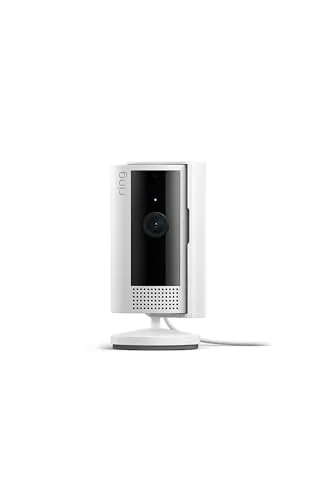
The most wallet-friendly way to add eyes to a room.
The most wallet-friendly way to add eyes to a room. This plug-in camera streams clear 1080p HD video to your phone, sends motion alerts, and supports two-way talk so you can hear and speak from anywhere. Its clean white finish blends into most rooms, making it an easy pick for a second or third camera around the house.
Hard to beat at this price — clear HD video, reliable alerts, and an unobtrusive design that disappears into any room.
Best for Full Room Coverage
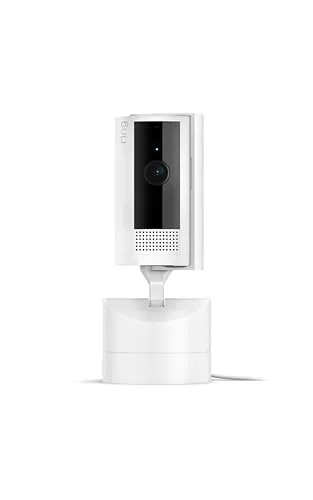
One camera that watches an entire room.
One camera that watches an entire room. From your phone you can swivel the lens a full 360 degrees and tilt up and down to follow movement or check a corner, instead of buying several fixed cameras. Add in HD video and two-way talk and it's the smart choice for larger living spaces, nurseries, or open-plan rooms.
The remote pan and tilt let a single camera cover a whole room, replacing two or three fixed cameras for the same money.
Best Indoor Outdoor Flexibility
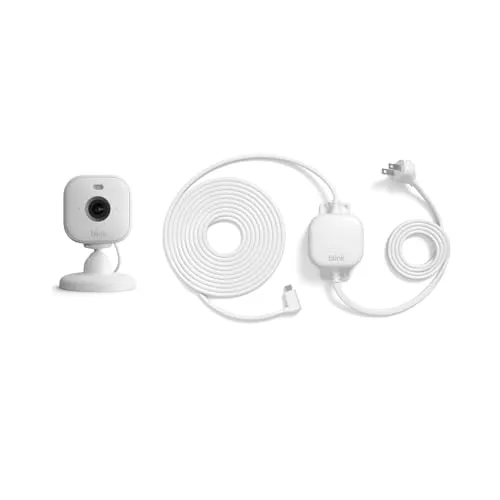
A tiny camera that doesn't have to stay indoors.
A tiny camera that doesn't have to stay indoors. It streams HD video with motion detection and adds a built-in spotlight for color night view, and with the included weather-resistant adapter you can move it to a porch or garage later. It's a great fit if you want one camera that can follow your needs around the house.
The built-in spotlight and weather-resistant adapter make it the most versatile pick — start indoors, move outside whenever you want.
Best for Flexible Placement
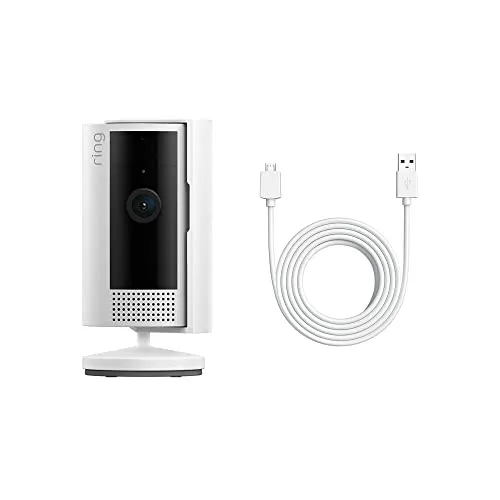
The same trusted indoor camera, bundled with a generous 10-foot power cable so you aren't tied to the nearest outlet.
The same trusted indoor camera, bundled with a generous 10-foot power cable so you aren't tied to the nearest outlet. That extra reach makes it easy to mount the camera high on a shelf or in a far corner for the best angle. You still get live view, motion alerts, two-way talk, and the privacy shutter that make the Indoor Cam a reliable everyday choice.
The longer included cable solves the most common install headache, letting you place the camera exactly where the view is best.
Review of Our Favorite 3
About the Author
Ilana Nevin
Ilana Nevin is a content creator and marketing professional who is passionate about new technology, home automation and the smart home revolution. She has been blogging about these topics for over five years and is excited to see how the industry continues to evolve.