Smart Thermostat C-Wire Explained (& How to Wire One Without It)

This post may contain affiliate links. Read our policy
If you've shopped for a smart thermostat, you've run into the term "C-wire" — usually as a warning. It's the single most common installation snag, and it stops a lot of upgrades cold. The good news: once you understand what a C-wire is, checking for one takes 30 seconds, and the fixes are cheap and DIY-friendly. This guide explains it all. For model recommendations, see our complete smart thermostat buyer's guide.
This article contains affiliate links. We may earn a commission if you make a purchase through our links, at no extra cost to you.
What is a C-wire?
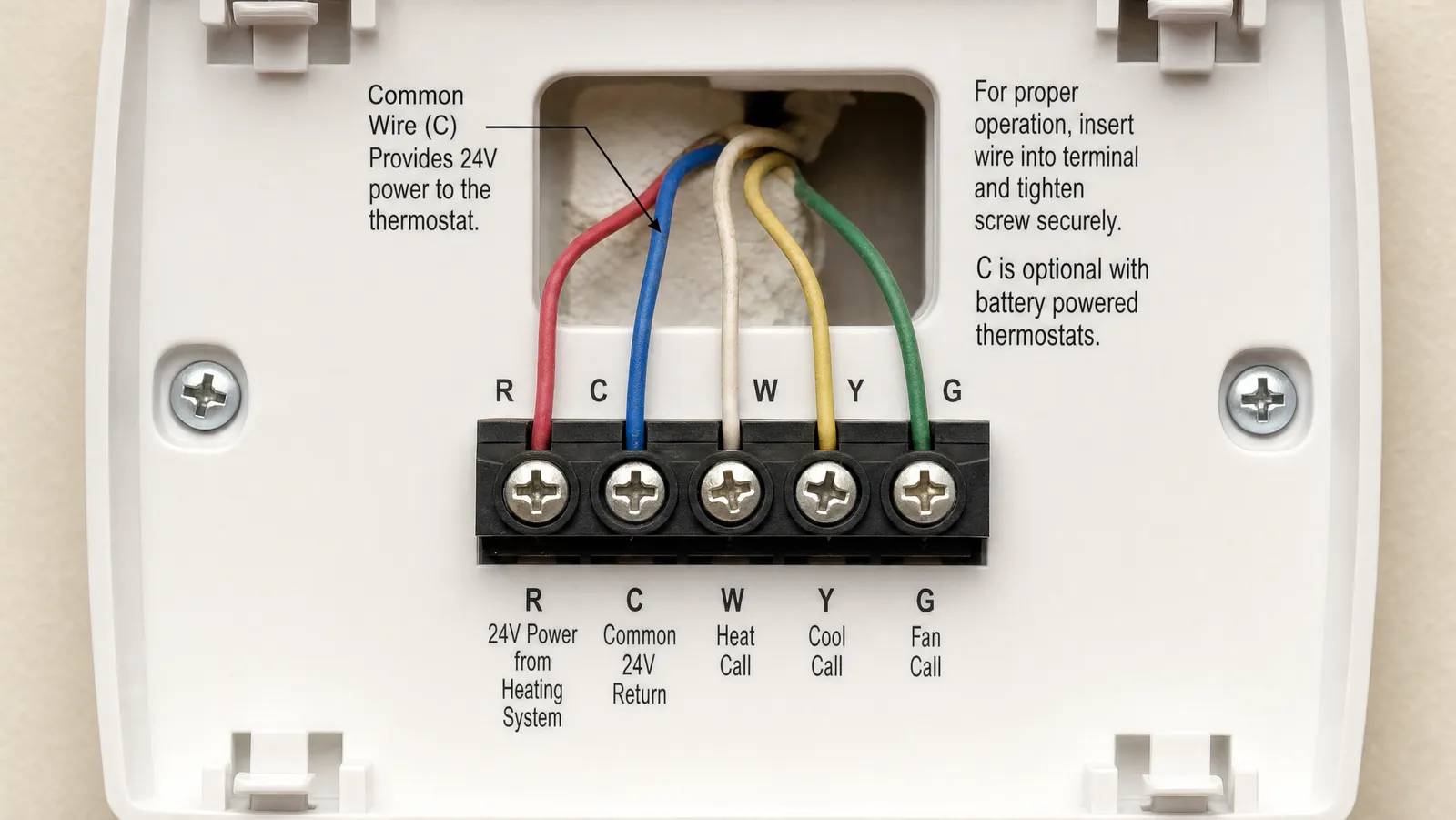
The C-wire, or "common wire," delivers continuous low-voltage (24V) power to your thermostat. Older, simpler thermostats didn't need constant power, so many homes — especially those with heat-only systems — were never wired with one. Smart thermostats, with their always-on screens, Wi-Fi radios, and sensors, generally do need that steady power, which is why the C-wire suddenly matters.
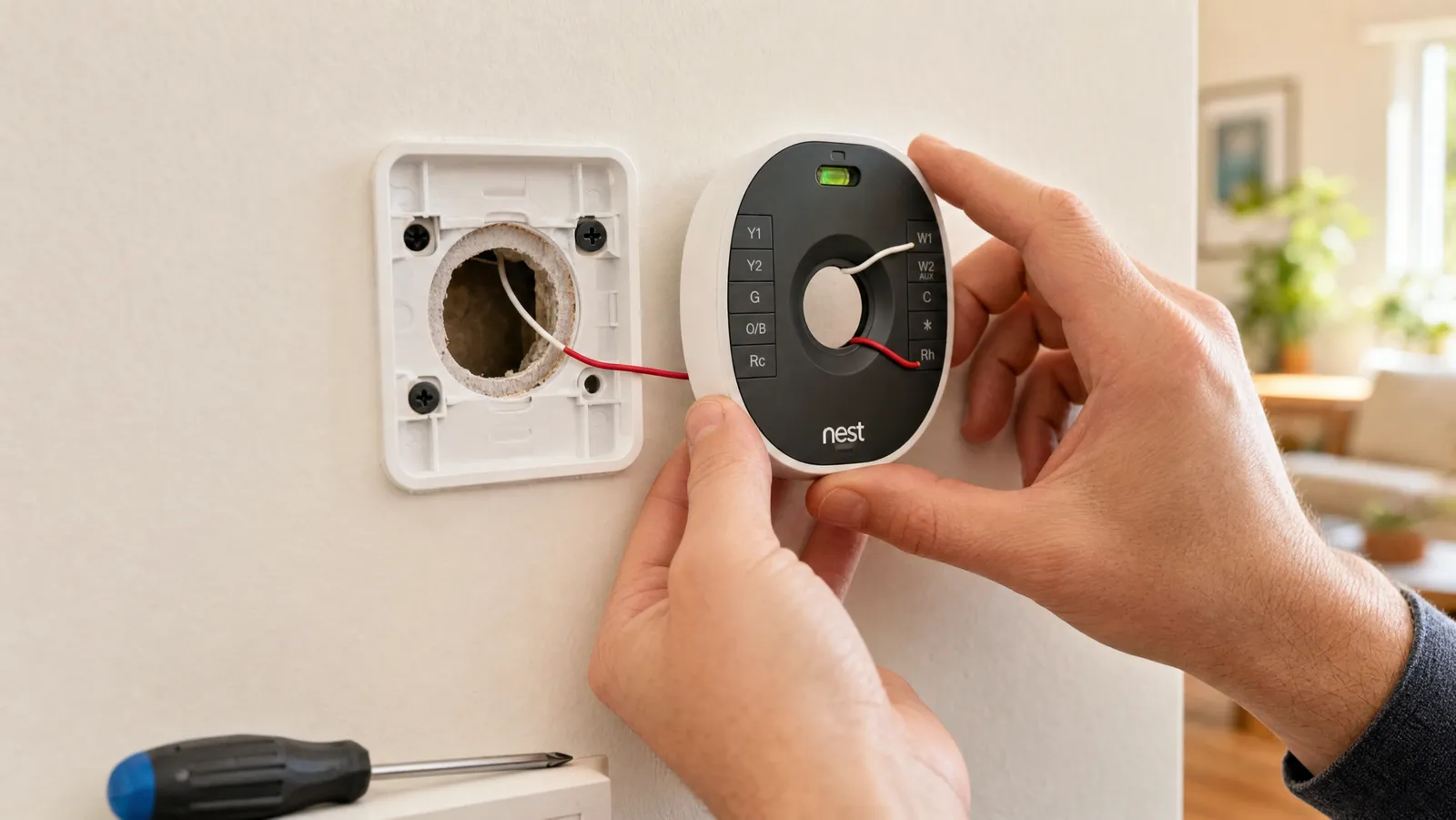
The other common wires you'll see at the thermostat are R (power), W (heat), Y (cooling), and G (fan). The C-wire completes the circuit so the thermostat can draw power continuously rather than just when the system is actively heating or cooling.
How to tell if you have a C-wire (30-second check)
- Turn off power to your HVAC at the breaker.
- Gently pull the thermostat face off its wall plate.
- Look at the labeled terminals. A wire seated in the terminal marked C means you have a common wire.
- No wire in C? Check for a spare, unused wire tucked into the wall — it can often be connected as a C-wire at both ends.
Take a photo of the wiring while you're in there; it's invaluable later. Our installation guide shows the full process.
What to do if you don't have a C-wire
You have four good options, from easiest to most involved:
- Buy a thermostat that doesn't need one. Battery-powered models like the Sensi ST55 require no C-wire in most homes. We round these up in our no-C-wire guide.
- Use a Power Extender Kit. ecobee's PEK (included with most ecobee thermostats, or about $25 separately) creates a C-wire from your existing wires at the furnace — no new cable. It needs at least four wires and a standard 24V system.
- Use a C-wire adapter. Similar idea from other brands; the Amazon and Honeywell thermostats include one (in the box or by free mail-in voucher).
- Repurpose a spare wire or run a new one. If there's an unused wire in the bundle, connect it at both ends. Running brand-new cable is a bigger job best left to an HVAC pro.
Power Extender Kit vs. battery: which is better?
- Battery (Sensi ST55): simplest, cheapest, nothing at the furnace — just occasional AA changes.
- Power Extender Kit / adapter (ecobee, Amazon, Honeywell): a few extra minutes at the furnace buys you an always-on, hardwired thermostat with no batteries.
Neither is wrong; it's a trade-off between a one-time furnace step and the occasional battery swap. We compare the two approaches in detail in the no-C-wire roundup.
Frequently asked questions
What does a C-wire do? It supplies continuous 24V power so a smart thermostat's screen, Wi-Fi, and sensors stay running. Without it, some thermostats can't power reliably.
Can I install a smart thermostat without a C-wire? Yes — choose a battery-powered model, use a Power Extender Kit or adapter, or repurpose a spare wire. See our no-C-wire guide.
Will any thermostat work with just two wires? Battery-powered models like the Sensi ST55 are designed for heat-only, two-wire systems. Most powered models need more wires or an adapter.
Is adding a C-wire hard? A Power Extender Kit or adapter is a straightforward DIY job at the furnace. Running entirely new cable is harder and often worth hiring out.
The bottom line
A C-wire is just a power-supply wire — not a dealbreaker. Check your terminals in 30 seconds, and if you don't have one, either pick a battery-powered thermostat like the Sensi ST55 or add a common wire with a Power Extender Kit. Either way, the upgrade you thought your wiring couldn't handle is well within reach. For the right model, see our complete smart thermostat buyer's guide.
Best C Wire Adapter

If you have no C-wire but at least four wires at the thermostat, ecobee's Power Extender Kit is the cleanest fix.
If you have no C-wire but at least four wires at the thermostat, ecobee's Power Extender Kit is the cleanest fix. It installs at your furnace control board and creates a common wire from your existing wiring — no new cable run. It comes free with most ecobee thermostats, but you can buy it separately for around $25. Note: it works with 24-volt systems only, not heat-only, dual-transformer, or high-voltage setups.
An inexpensive, no-new-wiring way to add a C-wire — the standard fix for ecobee installs and many others.
Best Way to Skip the C Wire Entirely

Don't want to deal with a C-wire at all? The Sensi ST55 runs on two AA batteries, so Emerson states a common wire is not required in most applications.
Don't want to deal with a C-wire at all? The Sensi ST55 runs on two AA batteries, so Emerson states a common wire is not required in most applications. For older two-wire homes it's the simplest possible answer — mount it and go, no adapter and no furnace trip. It's ENERGY STAR certified, works with Alexa, and carries a 4.5-star average across 19,000-plus reviews.
Sidesteps the whole C-wire question by running on batteries — the easiest path for two-wire homes.
Review of What We Liked
About the Author
Ilana Nevin
Ilana Nevin is a content creator and marketing professional who is passionate about new technology, home automation and the smart home revolution. She has been blogging about these topics for over five years and is excited to see how the industry continues to evolve.