Best Smart Locks for Your Front Door

This post may contain affiliate links. Read our policy
The front door key is one of the last analog holdouts in an increasingly connected home. A smart lock fixes that — letting you unlock with a fingerprint, a code, or your phone, lock up automatically when you leave, and grant access to family or guests without ever cutting a spare key. If you've already built out the rest of your setup with our smart home security guide, a smart lock is the upgrade that ties your most-used entry point into the system. Below are five locks we'd recommend right now, followed by everything you need to choose the right one.
Entry methods: how you actually get in
The single biggest difference between smart locks is how they let you unlock the door. Most modern locks offer several methods at once, and the best ones let every member of the household pick their favorite:
- Fingerprint — the fastest, most natural option. Touch and go, no code to remember.
- Keypad/passcode — great for guests, dog walkers, and anyone you don't want on the app. You can issue temporary codes and delete them later.
- App and remote — unlock from your phone, check whether the door is locked, and let someone in while you're across town.
- Physical key backup — a mechanical override for dead batteries or emergencies. We strongly prefer locks that keep one.
The more methods a lock supports, the more flexible it is. Our most versatile pick offers five different ways in, while a keypad-only deadbolt keeps things refreshingly simple.
Wi-Fi vs. Bluetooth vs. a hub
How a smart lock connects determines what you can do when you're not standing in front of it.
Bluetooth-only locks are the cheapest and most battery-efficient, but they only respond when your phone is within range — fine for hands-free unlocking as you walk up, useless for letting in a guest while you're at work.
Built-in Wi-Fi is the sweet spot for a front door. It lets you lock, unlock, and check status from anywhere and powers remote guest access, all without extra hardware. The trade-off is faster battery drain, though most of these locks still run for months to over a year before you need to think about power. Several use replaceable AA or 9V batteries rather than a rechargeable pack, and one of our picks — the Schlage keypad deadbolt — is a code lock with no Wi-Fi at all. Note that nearly all of these locks use the 2.4GHz Wi-Fi band, so make sure your router broadcasts it.
Hub-based locks route through a separate bridge. They can be very reliable and integrate deeply with a security ecosystem, but they add cost and one more box to plug in. For most people, a lock with Wi-Fi already inside is the simpler path.
Installation and compatibility
Good news: almost every smart deadbolt installs with a screwdriver in about 20 minutes, replacing your existing deadbolt without touching the door frame or wiring. Before you buy, check three things:
- Door thickness and backset — standard doors are covered, but confirm if yours is unusually thick or thin.
- Deadbolt vs. handle set — some picks replace just the deadbolt, while others (like our handle-set options) swap the entire lever and lock in one unit.
- Ecosystem — if you use Alexa, Google Assistant, or Apple HomeKit, buy a lock that matches so it lives in the same app as your cameras and doorbell.
That last point matters most if you're integrating the lock with the rest of your home. A lock and a doorbell that share an ecosystem can work together — see who's at the door on your video doorbells and unlock from the same screen.
How to choose the right smart lock
Start with how you want to get in. If a quick fingerprint is your priority, focus on the fingerprint-equipped picks. If you mostly need to hand out codes to guests, a solid keypad deadbolt is plenty. Then weigh remote access: built-in Wi-Fi is worth it if you'll regularly let people in while you're away. Finally, match the lock to your door and your existing smart home. Budget shouldn't be the only filter — but as our picks show, you can get full keyless entry with auto-lock and Wi-Fi without overspending.
Frequently asked questions
Are smart locks secure? Yes. Reputable smart locks use the same heavy-duty deadbolt hardware as traditional locks, add encrypted communication, and let you delete codes or revoke app access instantly — something you can't do with a copied physical key.
What happens if the batteries die? Most quality locks warn you well in advance and last many months on a charge. The locks we recommend keep a mechanical key backup or an emergency power option so you're never stranded outside.
Can I let guests in remotely? With any of the Wi-Fi-enabled picks above, yes. You can unlock from your phone from anywhere or issue a temporary passcode that works only when you want it to.
Best Overall
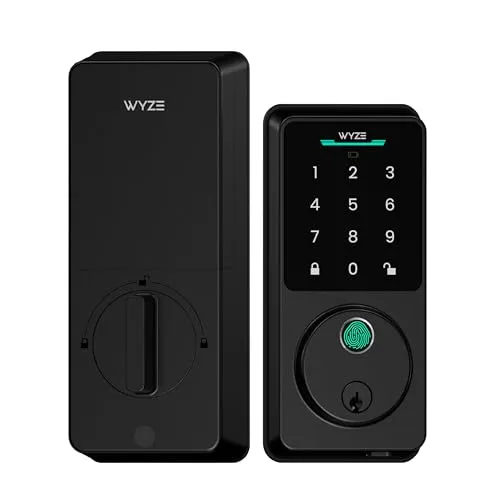
The Wyze Auto-Lock Bolt v2 packs fingerprint, keypad, and app entry into one affordable deadbolt, with built-in Wi-Fi so you can lock up or grant access from anywhere.
The Wyze Auto-Lock Bolt v2 packs fingerprint, keypad, and app entry into one affordable deadbolt, with built-in Wi-Fi so you can lock up or grant access from anywhere. Auto-lock means you never have to wonder whether you secured the door behind you, and the anti-peep keypad keeps nosy passersby from spotting your code. Long battery life and included backup keys round out a lock that's hard to beat for the price.
Fingerprint, keypad, and app entry plus auto-lock and built-in Wi-Fi make this the most complete lock for the money.
Most Versatile
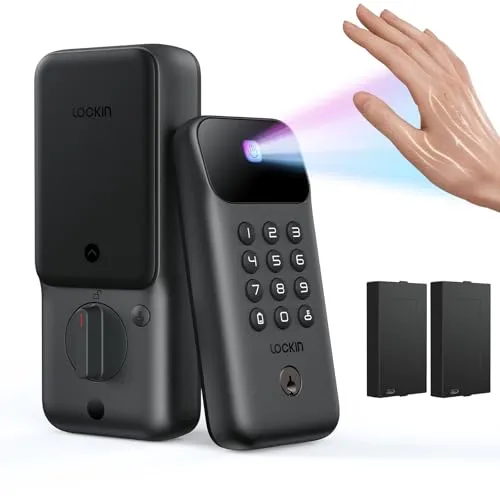
With five ways to unlock and built-in palm-vein recognition, the Lockin Venoris Go is the pick for households that want a way in for everyone.
With five ways to unlock and built-in palm-vein recognition, the Lockin Venoris Go is the pick for households that want a way in for everyone. Built-in Wi-Fi ties it into your smart home so you can check the lock and let guests in remotely, while dual batteries deliver well over a year of use before you think about swapping them. It's the most flexible lock here for busy families.
Five unlock methods, palm-vein recognition, and dual long-life batteries make it the most flexible choice for busy households.
Best Keypad
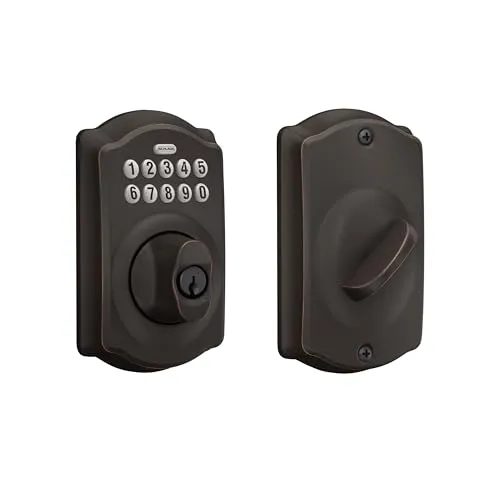
When you want rock-solid keyless entry without fussing over an app, the Schlage Camelot keypad deadbolt delivers.
When you want rock-solid keyless entry without fussing over an app, the Schlage Camelot keypad deadbolt delivers. Schlage's build quality is the benchmark for residential locks, and the backlit keypad with mechanical key backup means you're never locked out. It's the straightforward, dependable choice for anyone who simply wants to ditch the house key.
Trusted Schlage durability, an easy backlit keypad, and a mechanical key backup make it the most dependable code-only lock.
Best for Interior Doors
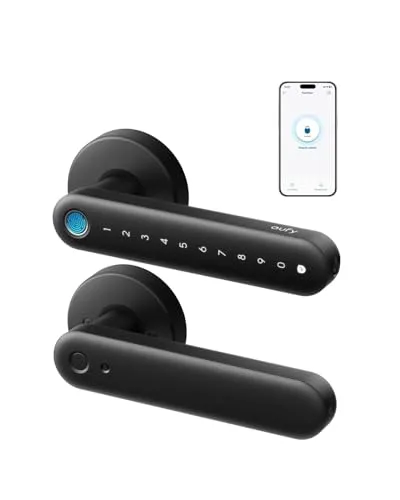
The eufy FamiLock C32 is designed for interior doors — think a bedroom, home office, or storage room — rather than your front entry, and the listing notes it is not recommended for exterior front doors.
The eufy FamiLock C32 is designed for interior doors — think a bedroom, home office, or storage room — rather than your front entry, and the listing notes it is not recommended for exterior front doors. It combines a lock and lever handle in one tidy unit, so you replace the whole handle set in a single install. Fingerprint, app, and code entry cover every family member, and built-in 2.4GHz Wi-Fi works with Alexa and Google so you can check and control it remotely.
An all-in-one handle and lock with fingerprint entry and Wi-Fi, ideal for securing an interior room.
Best Budget
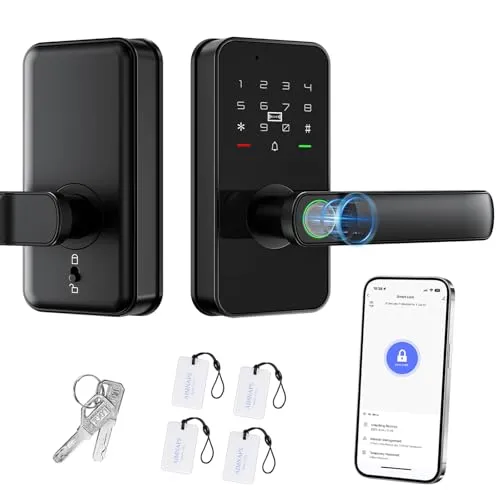
The AIMNAPS keyless handle set proves you don't have to spend a fortune to go keyless.
The AIMNAPS keyless handle set proves you don't have to spend a fortune to go keyless. It offers fingerprint, passcode, app, and key entry, plus auto-lock and Wi-Fi control, all at an entry-level price. For a rental, a side door, or a first smart lock, it's an easy and inexpensive way to dip into keyless living.
Fingerprint, code, app, and key entry with auto-lock and Wi-Fi at the lowest price in this roundup.
Review of Our Favorite 3
About the Author
Ilana Nevin
Ilana Nevin is a content creator and marketing professional who is passionate about new technology, home automation and the smart home revolution. She has been blogging about these topics for over five years and is excited to see how the industry continues to evolve.